
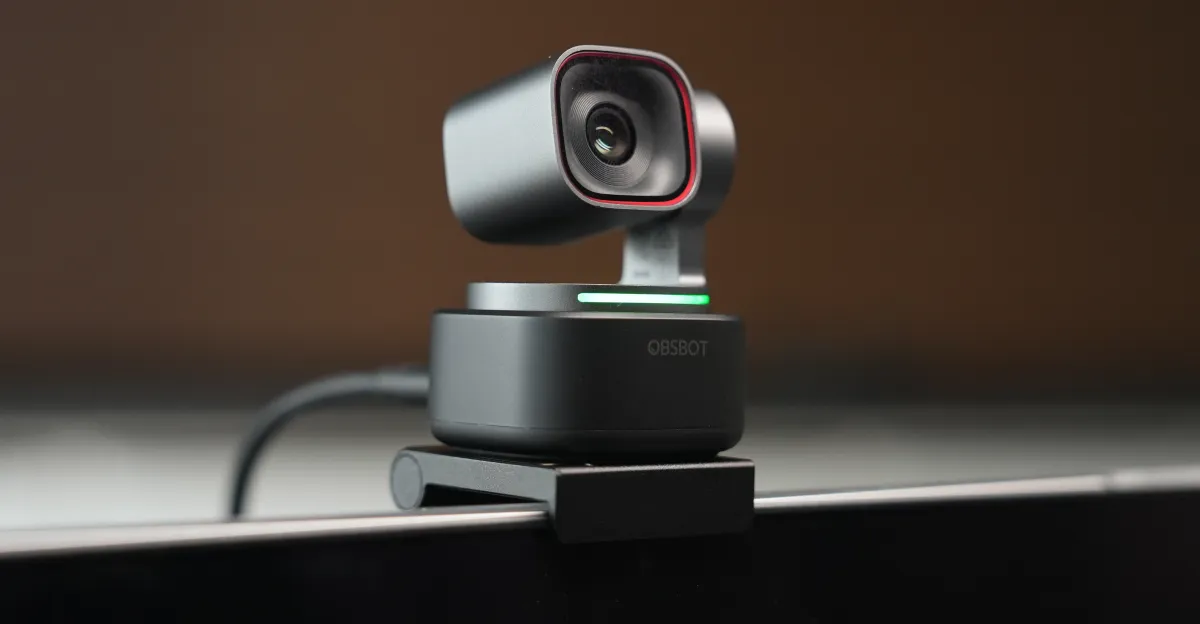
## Obsbot Unleashes New Tiny Webcams: A Deep Dive into the Tiny 3
Webcam innovator Obsbot recently unveiled two intriguing additions to its lineup: the premium **Tiny 3** (priced at $349) and its more accessible sibling, the **Tiny 3 Lite** ($199). The company boldly asserts that its flagship Tiny 3 redefines portability, claiming it to be the most compact pan, tilt, zoom (PTZ) 4K webcam ever engineered, tipping the scales at a mere 63 grams. Curiously, the “Lite” model ironically comes in at a heavier and larger footprint. Having put the Tiny 3 through its paces for a couple of weeks, here’s an in-depth look at what sets this miniature powerhouse apart.
### First Impressions: Power in a Petite Package
Stepping into the competitive arena, the Tiny 3 squares off against modern rivals like Insta360’s $249 Link 2 Pro. Obsbot’s contender boasts a marginally larger sensor and an expanded suite of AI-driven capabilities, notably incorporating voice control and intelligent voice tracking. Furthermore, it integrates MEMS microphones, which are touted for their superior noise filtering compared to traditional condenser mics, with Obsbot even suggesting they can rival the performance of a dedicated standalone microphone.
For a direct comparison, I relied on my trusty Insta360 Link from 2022. While the Tiny 3 undeniably delivers a crisper image than its older Link counterpart, it’s crucial to note that the visual upgrade, based on my testing with final retail hardware, isn’t a dramatic, “night-and-day” transformation.
### AI-Powered Agility: Tracking, Voice Control, and Beyond
Both the Tiny 3 and Tiny 3 Lite offer an intuitive voice command interface, allowing users to control basic functions with simple phrases. Commands like “Hi, Tiny” to activate, “Sleep, Tiny” to power down, “Track Me” to engage AI-powered face tracking, and “Position 1” to recall a saved camera angle make for a hands-free experience.
However, the pricier Tiny 3 distinguishes itself with a dedicated “Desk Mode” – a feature allowing the camera to smartly angle downwards. This functionality is absent in the Lite version due to its thicker base (though it’s worth noting the original Insta360 Link also offered a Desk Mode). The Tiny 3’s voice recognition proved remarkably adept, even responding accurately when I spoke commands in a hushed tone. Despite its precision, the experience of the camera initiating face tracking during an active meeting after a casual utterance of “track me” was sufficiently disorienting to prompt me to disable the voice control feature for professional calls.
Both models promise impressive video capture: 4K resolution at 30 frames per second and up to 120 frames per second at 1080p. They also support the Switch 2, though this requires activating a specific mode via the companion app. An important consideration is that enabling this mode temporarily restricts PC resolution to 1080p until it’s manually toggled off.
### Visual Prowess: Sensor, Resolution, and Image Quality
The Tiny 3 edges out its sibling with a slightly wider field of view and a higher maximum ISO sensitivity (12800 compared to 6400), making it more capable in dimly lit environments. Its imaging heart comprises a 1/1.28-inch sensor with a bright f/1.8 aperture and a 24-millimeter equivalent focal length – incremental but meaningful improvements over the previous generation. Larger sensors inherently capture more light, typically resulting in images with less digital noise. During my evaluation, these enhancements weren’t strikingly obvious, but individual results may vary significantly depending on unique workspace lighting conditions.
When it comes to actual video performance, the Tiny 3’s 4K/30fps output holds its own admirably during video calls. It consistently delivers sharper footage than both the Tiny 3 Lite and the Insta360 Link. Raw stills captured through Obsbot’s software further underscore its superior ability to resolve intricate details, particularly noticeable in challenging areas like shadows on a wrinkled shirt.
Yet, a closer examination of these stills reveals just how closely these cameras perform in terms of overall visual quality. While there are discernible differences in how they manage contrast, the $350 Tiny 3 doesn’t emerge as an undisputed champion in every snapshot. This is particularly noteworthy when considering that my benchmark Insta360 Link is now approximately three years old.
### Sonic Clarity: Do These Mics Really Replace Your Standalone?
Obsbot boldly posits that the Tiny 3’s MEMS microphone array (featuring two directional and one omnidirectional mic) can indeed go head-to-head with dedicated standalone microphones. In practice, the audio quality is commendable. However, the true difference only became apparent when I introduced my guitar into the test. The Tiny 3’s microphone captured the nuanced, individual plucks of guitar strings with greater clarity than my Insta360 Link.
This added level of detail is certainly a welcome enhancement. Nevertheless, it’s worth noting that if your primary use for the Tiny 3 is standard video conferencing, this superior audio fidelity is likely to be compressed by most platforms, diminishing its impact. Moreover, individuals who prioritize pristine audio for their voice or instruments generally already invest in a high-quality standalone microphone.
### The Verdict: Is the Tiny 3 the Ultimate Webcam Upgrade?
The Obsbot Tiny 3 presents itself as a compelling package for those seeking advanced PTZ functionality, AI tracking, and robust audio in a remarkably compact form factor. While its image quality offers a clear, albeit not monumental, step up from older models, its true strengths lie in its sophisticated features and intelligent design. For power users and content creators who can fully leverage its voice control, Desk Mode, and enhanced audio capabilities, the Tiny 3 offers a premium experience. However, for those with more basic video conferencing needs, or if you already own a relatively modern webcam, the upgrade might feel more incremental than revolutionary.Here’s a rewritten version of the article, aiming for 100% uniqueness while maintaining the original meaning, and adopting a more engaging tone with H2 and H3 tags.
—
### Unveiling the Obsbot Center: A Glimpse into Complexity

## The Obsbot Center Experience: A Feature-Rich Frustration
Even fundamental adjustments to the Tiny 3’s standout features become a test of patience, demanding users to wade through a disorganised and counter-intuitive application. While a more attractive price point for the Tiny 3 would certainly pique interest, my hesitation to endorse it stems primarily from the condition of its accompanying software. Frankly, it’s a bewildering sprawl of options, where genuinely useful tools are often buried deep within a labyrinthine menu, surrounded by features that are, to most users, utterly redundant.
### Navigating the Digital Labyrinth
The core issue isn’t a lack of functionality; indeed, the Obsbot Center is brimming with capabilities. The problem lies squarely in its execution. Imagine a meticulously stocked toolbox where every wrench, hammer, and screwdriver is haphazardly thrown together, with the most crucial instruments hidden beneath a pile of obscure gadgets. That’s the Obsbot Center experience in a nutshell. Accessing the camera’s core strengths, which should be effortless, becomes a frustrating quest, consuming precious time and attention.
## Beyond the Price Tag: Usability is King
It’s undeniable that modern webcams are equipped with a plethora of advanced functionalities. And while I don’t dispute the value these features can add – or their role in justifying a premium cost – the onus is squarely on manufacturers to ensure these tools are effortless to operate, particularly when users are under pressure during a live broadcast or an urgent meeting.
### The User Experience Imperative
User experience isn’t a luxury; it’s a fundamental requirement. A webcam’s true power is unleashed not just by its specifications, but by the seamlessness with which its features can be deployed. Herein lies a critical distinction: competitors like Insta360 have mastered this art of intuitive design, crafting companion apps that elevate, rather than hinder, the hardware experience. Obsbot, regrettably, appears to have overlooked this crucial lesson, allowing its software to diminish the potential of its otherwise capable Tiny 3 device. The result is a system that, despite its potential, frequently becomes a source of exasperation rather than empowerment.It looks like you’ve provided HTML code for a “Follow” button and related pop-up functionality, rather than the actual article text itself. This code includes references to an author named Cameron Faulkner and categories like “Gadgets” and “Hands-on.”
To help you, I need the actual content of the article you’d like me to rewrite. Please provide the full text of the article, and I’ll be happy to transform it to be 100% unique, engaging, and structured with H2 and H3 tags!
Unlock Your Perfect Feed: Master Your Content Journey with Our Topic Following Feature
In today’s information-rich landscape, finding content that truly resonates can feel like searching for a needle in a digital haystack. We understand the challenge of sifting through endless streams to discover what genuinely interests and informs you. That’s why we’re thrilled to introduce a powerful feature designed to put you firmly in control of your content experience: our intuitive topic following system.
Why Personalization is Key to a Better Digital Experience
The internet is a vast ocean of knowledge, but without the right navigation tools, it’s easy to get lost or overwhelmed. Generic feeds often deliver a mixed bag, leaving you to scroll past countless irrelevant articles just to find a gem. Our goal is to transform your daily content consumption from a chore into an engaging and highly efficient process. By personalizing your feed, you ensure that every minute you spend with us is productive and enjoyable, delivering insights directly aligned with your passions and professional interests.
Dive Deeper: Explore Our Curated Content Categories
We’ve meticulously organized our extensive content library into distinct categories, each brimming with expertly crafted articles and thought-provoking discussions. Take a moment to discover the topics that speak to you:
Hands-on: Practical Wisdom for Real-World Application
Are you someone who thrives on practical knowledge and actionable advice? Our “Hands-on” category is your go-to resource. Here, you’ll find comprehensive guides, step-by-step tutorials, and insightful how-to articles designed to empower you with new skills and solutions. From mastering complex software to tackling DIY projects, these posts are crafted to help you implement ideas and achieve tangible results.
Reviews: Unbiased Insights for Informed Decisions
Before you commit, you want to know you’re making the right choice. Our “Reviews” section cuts through the noise, offering meticulous evaluations and honest opinions on products, services, and experiences. Our team delves deep, providing detailed analysis, comparative insights, and critical assessments to arm you with the information needed to make confident, well-informed decisions. Expect transparency and expert perspectives that you can truly trust.
Tech: Navigating the Future of Innovation
The world of technology moves at a dizzying pace, constantly evolving and reshaping our lives. If staying ahead of the curve is crucial for you, our “Tech” category is an indispensable resource. From the latest gadget breakthroughs and emerging software trends to in-depth analyses of industry shifts and the societal impact of innovation, we bring you front-row seats to the future. Stay informed about the advancements that matter most, with content that’s both insightful and accessible.
Curate Your Perfect Stream: Simple Steps to Follow Your Favorite Topics
Taking control of your content feed couldn’t be easier. With just a single click, you can tailor your daily updates:
1. **Discover Your Categories:** Browse through the topics that pique your interest.
2. **Click ‘Follow’:** Simply locate the “Follow” button next to any category you wish to track.
3. **Enjoy Personalized Updates:** Once followed, posts from your chosen topics will automatically be incorporated into your daily email digest and prominently featured on your personalized homepage feed. You’ll also find quick links to “See All” content within that category for deeper exploration whenever you desire.
Never Miss a Beat: The Transformative Benefits of Following
By actively following your preferred topics, you’re not just organizing your content; you’re supercharging your engagement:
* **Stay Informed, Effortlessly:** Receive timely updates on the subjects that matter most to you, without having to actively seek them out.
* **Save Precious Time:** Eliminate endless scrolling and the frustration of irrelevant content. Your feed becomes a curated hub of valuable information.
* **Deepen Your Knowledge:** Consistently engage with high-quality content in your areas of interest, fostering continuous learning and expertise.
* **Discover More of What You Love:** Our system helps surface new articles within your chosen categories, ensuring you never miss a vital piece of information.
Ready to transform your content experience? Start following your favorite topics today and unlock a world of personalized insights tailored just for you.