
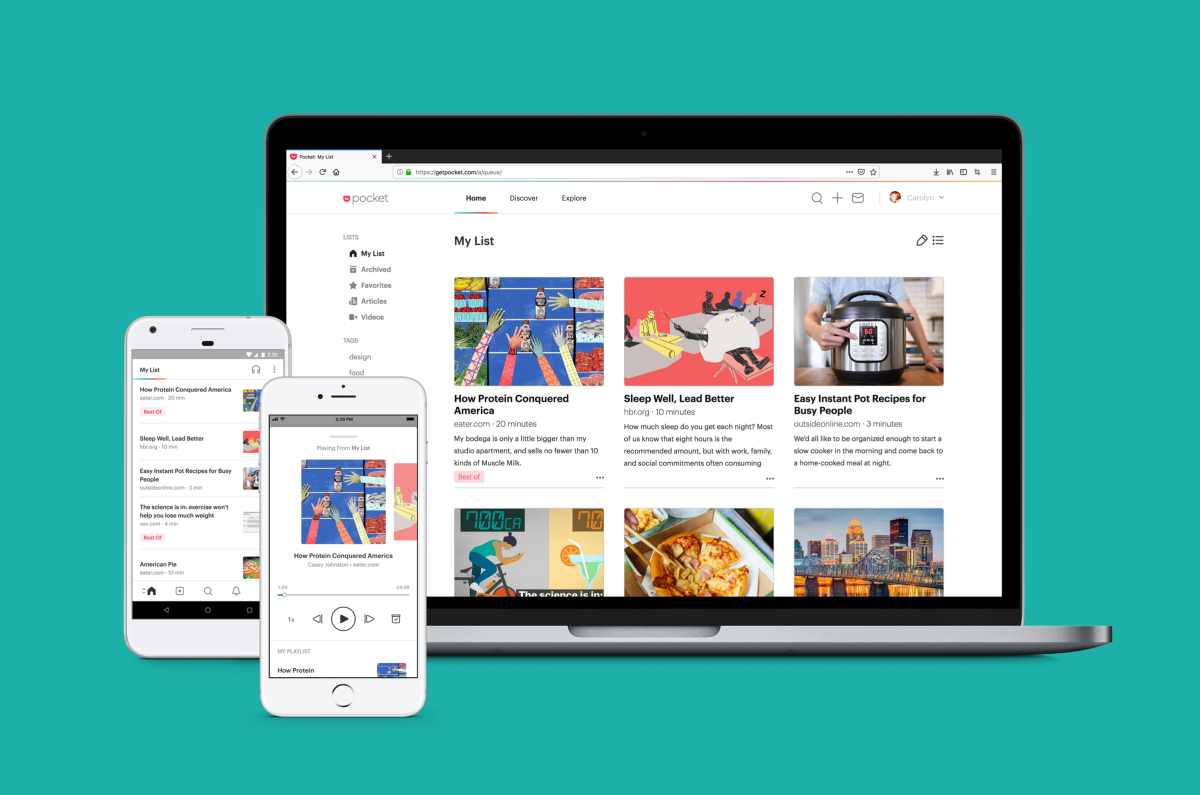
**Key Takeaways:**
* Mozilla’s May 2025 shutdown of Pocket created a significant void, highlighting the enduring need for “read-it-later” services despite shifting browsing habits.
* A diverse ecosystem of alternatives, including Matter, Instapaper, and Raindrop.io, are stepping up, with many offering robust free tiers and premium features like AI integration and text-to-speech.
* Former Pocket users faced an urgent October 8, 2025 deadline to export their data, underscoring the importance of data portability in the evolving digital landscape.
The Post-Pocket Era: Navigating Your Digital Reading List After Mozilla’s Shutdown
The digital world felt a tremor in May 2025 when Mozilla announced the impending shutdown of Pocket, the beloved read-it-later app it had acquired in 2017. For millions, Pocket was more than just an app; it was a personal curator, a digital sanctuary for articles, videos, and web pages earmarked for deeper engagement in quieter moments. Its demise, effective October 8, 2025, left a tangible void and sparked an immediate scramble for suitable alternatives, particularly for those who relied on it to manage an ever-growing backlog of long-form content.
Mozilla’s official stance pointed to evolving web browsing habits as the reason for its exit from the read-it-later space. While their perspective suggests a move away from dedicated saving, the subsequent surge in adoption for other platforms tells a different story: the fundamental human desire to bookmark and revisit valuable content remains stronger than ever. The departure of a major player like Pocket has, paradoxically, invigorated the market, boosting established competitors and fostering the rise of new, independent solutions eager to fill the gap.
The Migration Imperative: Don’t Leave Your Reads Behind
This transition, however, wasn’t without its immediate challenges. A critical aspect of Pocket’s shutdown was the hard deadline for data export. Users had only until October 8, 2025, to retrieve their meticulously curated collections – including saved articles, custom lists, archives, favorites, notes, and highlights. This urgent call to action served as a stark reminder of the importance of data portability and the need for users to maintain control over their digital assets, especially when relying on third-party services. Many of the alternative apps quickly moved to support imports, easing the migration path for those who acted swiftly.
Spotlight on the Successors: Where to Save Your Next Read
Matter: The AI-Enhanced Reading Hub
Emerging as a strong contender, Matter, backed by GV, offers a sleek and modern experience designed for the discerning reader. Available primarily as an iOS app, it also provides robust browser extensions for Chrome, Safari, and Firefox, ensuring seamless content saving across platforms. Matter goes beyond simple saving; it transforms your reading list into an interactive library. Users can not only save articles but also listen to them with high-quality text-to-speech, and even transcribe their favorite podcasts directly within the app, making it a versatile tool for both visual and auditory learners.
While the core app functionality is free, Matter offers a premium subscription at $79.99 per year. This unlocks advanced features like significantly improved transcriptions for podcasts and YouTube videos, customizable tools to adjust reading speed for optimal comprehension, and deeper integrations with popular external apps such as notes apps, Gmail, and Kindle. A notable innovation came in March 2025 with the introduction of an AI-powered co-reader, allowing users to ask questions and gain deeper insights into the topics they’re reading about – a powerful feature for research and learning.
Instapaper: The Enduring Classic
Instapaper stands as one of the venerable giants in the read-it-later space, founded by developer Marco Arment back in 2008. Its longevity speaks volumes about its reliability and effectiveness. Available on both iOS and Android, Instapaper continues to offer a generous free tier, allowing users to save an unlimited number of articles and videos without any cost. Its clean, minimalist interface has long been lauded for minimizing distractions, focusing purely on the content at hand. Acquired by Pinterest in 2016, it has maintained its core mission despite corporate changes.

For those seeking more advanced capabilities, Instapaper Premium is available for $59.99 per year. This subscription enhances the core experience by allowing users to add notes and highlights to saved articles, create a permanent archive, enjoy a text-to-speech playlist, and utilize full-text search across all saved items. A particularly valuable feature for avid readers is the ability to send articles directly to a Kindle device for distraction-free e-ink reading. Instapaper also demonstrated its commitment to the migrating Pocket users by offering a seamless import process and a generous three-month free trial to Instapaper Premium for those who made the switch.
Raindrop.io: The Visual Organizer’s Dream
While primarily known as a powerful bookmark manager for web browsers, Raindrop.io cleverly integrates read-it-later functionality within its ecosystem. Its accompanying mobile apps for iOS and Android allow users to not only access their organized bookmarks but also comfortably read saved articles and PDFs. Raindrop.io excels in visual organization, letting users create rich collections with tags and nested folders, making it ideal for those who manage a vast array of web content beyond just articles. The free version offers unlimited bookmark saving and useful integrations with services like Zapier and IFTTT, allowing for automated workflows.
The premium version, priced at an affordable $33 per year, significantly expands its capabilities. Subscribers gain access to AI-powered suggestions for organizing content more efficiently, a powerful full-text search function, and the ability to set reminders for their bookmarks. It also includes practical tools like a duplicate and broken links finder, ensuring a clean and functional library, and increases the file upload limit to a substantial 10GB per month, making it suitable for saving entire web pages, images, and documents.

Plinky: The Indie Contender for Focused Saving
Filling the void with a more personalized touch, Plinky was created by former Twitter engineer Joe Fabisevich. This indie offering aims to provide a streamlined, privacy-focused experience for saving and categorizing virtually any type of online content. Plinky distinguishes itself with a clean, minimalist interface that prioritizes quick saving and efficient recall, reducing visual clutter often found in more feature-heavy applications. It’s designed for users who appreciate simplicity and directness, allowing them to easily tag, sort, and search their saved items without unnecessary complexity.
While specific premium tiers and advanced features are still evolving, Plinky’s initial focus is on robust local storage options and excellent cross-device synchronization, ensuring users always have access to their saved content. It offers comprehensive support for various content types, from articles and videos to images and even code snippets, making it a versatile tool for professionals and casual savers alike. Plinky represents the growing trend of independent developers responding to market needs with user-centric solutions, often emphasizing privacy and a bespoke user experience over corporate feature bloat.
Beyond the Apps: The Enduring Need for Digital Curation
The narrative of Pocket’s shutdown and the subsequent rise of alternatives underscores a fundamental truth about our digital lives: information overload is a persistent challenge. In an age where content streams incessantly from every corner of the internet, the ability to “pause” and curate what truly matters is more valuable than ever. Read-it-later apps aren’t just about convenience; they are essential tools for knowledge workers, students, and curious minds seeking to manage their attention, deepen their understanding, and transform transient web links into lasting personal libraries. They empower users to reclaim control over their consumption, fostering a more intentional and less reactive relationship with online content.
Choosing Your Next Digital Home
Selecting the right Pocket alternative depends heavily on individual needs and priorities. Do you value AI-driven insights and audio features? Matter might be your best bet. Are you a long-time reader who prioritizes a clean interface and Kindle integration? Instapaper could be the perfect fit. If visual organization and robust bookmarking are paramount, then Raindrop.io shines. For those seeking a minimalist, privacy-conscious solution from an independent developer, Plinky offers a compelling vision. Consider factors like cross-platform availability, cost, premium features, and most importantly, ease of importing your existing Pocket library (if still possible for late movers) when making your decision.
Bottom Line
Pocket’s exit marks the end of an era but simultaneously ushers in a new chapter for digital content curation. While Mozilla saw changing browsing habits, the vibrant ecosystem of emerging and established alternatives proves that the “read-it-later” need is far from obsolete. Users now have a wealth of powerful, feature-rich options, many leveraging AI and offering flexible pricing models, ensuring that the art of saving, reading, and truly engaging with online content will continue to thrive, albeit in new and exciting digital homes. The future of mindful digital consumption looks diverse and promising.
Beyond the Bookmark Bar: Navigating the Best Read-It-Later Apps
In an age of endless information streams, the quest for digital tranquility often leads us to “read-it-later” apps. These tools promise to rescue us from a deluge of open tabs and forgotten links, offering a curated space to consume content at our own pace. But with a growing ecosystem of options, which one truly delivers on its promise of focus and organization? We dive into some of the most compelling contenders in the space.
Key Takeaways
- Diverse Needs, Diverse Tools:From minimalist savers to comprehensive knowledge managers, the “read-it-later” app market caters to a spectrum of user requirements, emphasizing organization, annotation, or multi-platform access.
- Subscription Models Vary:While free tiers offer basic functionality, advanced features like unlimited storage, AI assistance, or deep integrations often come with monthly, annual, or even lifetime payment options, reflecting the value proposition of each service.
- Longevity and Ecosystem Matter:The long-term viability and platform reach (Apple-centric, cross-platform) are critical factors, as evidenced by Paperspan’s update status versus Readwise Reader’s robust, actively developed ecosystem.
The Digital Deluge and the Rise of Intentional Reading
Every day, we encounter a tidal wave of articles, videos, podcasts, and social media threads that pique our interest. The modern browser, with its ever-expanding tab count, often becomes a graveyard for good intentions. This digital clutter isn’t just an aesthetic nuisance; it’s a cognitive drain, pulling our focus and preventing us from truly engaging with the content we *want* to consume. This is precisely the problem “read-it-later” apps aim to solve. By providing a dedicated space to save, organize, and revisit content, these applications transform casual browsing into intentional reading, allowing users to curate their own digital library for moments of focused attention.
These aren’t just simple bookmarking tools. The best read-it-later apps go further, stripping away distractions, enabling offline access, and often integrating powerful organizational and annotation features. They empower users to take control of their information intake, turning potential distractions into valuable resources for learning, leisure, or work. Let’s explore some of the current front-runners offering a sanctuary for your digital discoveries.
Plinky: The Meticulous Curator for Apple Enthusiasts
For those deeply embedded in the Apple ecosystem,Plinkyemerges as a polished and intuitive solution for managing digital content. Launched recently, Plinky aims to be more than just a place to stash links; it’s designed as a personal knowledge manager, offering robust tools to organize and revisit virtually any type of online content. Whether it’s an in-depth article, a captivating video, a complex recipe, or a fleeting meme, Plinky provides a centralized hub.
The app’s native integration across all Apple platforms—iPhone, iPad, Mac, and even browser extensions for easy saving—makes the capture process seamless. Once a link is saved, Plinky truly shines with its organizational capabilities. Users can leverage folders and tags to categorize their growing collection with granular precision. A standout feature is the ability to set reminders, transforming passive saving into active engagement by prompting you to read or watch saved content at a specific, chosen time. This proactive approach helps combat the “save and forget” syndrome common with simpler bookmarking tools.
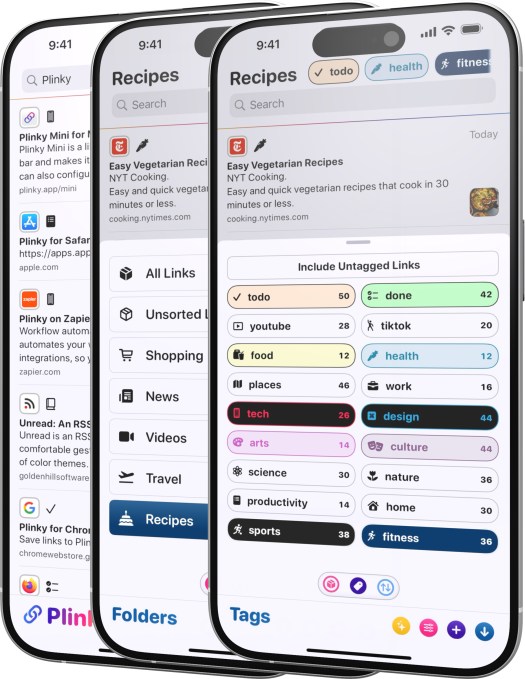
Plinky offers a generous free tier, allowing users to save up to 50 links, create three folders, and utilize five tags. This provides ample opportunity to test the waters and experience its core functionality. For power users seeking to unlock the full potential, the Pro version removes these restrictions entirely, offering unlimited links, folders, tags, and reminders. Pricing is flexible, with options for $3.99 per month, $39.99 annually, or a one-time purchase of $159.99 for lifetime access. This lifetime option is particularly appealing for those looking for a long-term investment in their digital organization without recurring costs.
Paperspan: The Minimalist Reader with a Question Mark
For users who prioritize simplicity and a distraction-free reading experience,Paperspanpresents itself as a straightforward solution. It delivers on the core promise of a read-it-later app: a unified reading list accessible across various devices. Its features are uncomplicated yet effective, including the ability to add notes to articles and a handy text-to-speech functionality for hands-free consumption.
The app’s basic functionality is available for free, making it an accessible option for casual users. For those desiring more advanced tools, Paperspan offers an $8.99 per month subscription. This unlocks features like advanced search, the ability to create content playlists, detailed reading statistics, and direct integration to send articles to a Kindle device. This premium tier enhances the experience for more dedicated readers who want deeper insights into their habits and seamless device transfer.
However, a significant red flag for Paperspan is its development status. While the app remains functional and available on both iOS and Android, it hasn’t received significant updates for some time. In the fast-evolving tech landscape, a lack of regular updates can signal potential long-term issues, including compatibility problems with newer operating system versions, unpatched security vulnerabilities, and a general stagnation of features. While its simplicity might appeal, potential users should weigh this lack of active development against their need for a robust, future-proof solution.
Readwise Reader: The Powerhouse for Annotators and Knowledge Managers
Emerging from the popular Readwise highlighting and note-taking service,Readwise Reader, launched in 2021, is designed for the serious reader and knowledge worker. It’s not just a place to save articles; it’s a comprehensive platform to ingest, process, and integrate information from virtually any source. The app boasts impressive import capabilities, allowing users to pull in RSS feeds, YouTube videos, Twitter threads, PDFs, and even ePubs, creating a truly universal inbox for all types of content.

The true strength of Reader lies in its deep integration with the broader Readwise ecosystem, which excels at surfacing highlights and notes for spaced repetition and knowledge retention. This makes Reader a prime choice for academic users, researchers, or anyone serious about extracting and retaining information from what they read. Its annotation features are top-tier, complemented by offline text search and even an integrated AI assistant to help summarize or query content.
Beyond its internal capabilities, Reader boasts impressive external integrations with leading knowledge management apps such as Obsidian, Notion, Roam Research, Evernote, and Logseq. This connectivity allows users to seamlessly transfer their highlights and notes into their preferred personal knowledge base, creating a powerful workflow for learning and creative work. Readwise Reader offers a 30-day free trial, after which access requires a $9.99 per month Readwise subscription. This positions it as a premium tool for users who are willing to invest in a sophisticated information management system.
Notably, Readwise had previously facilitated Pocket users in importing their entire archives, clearly positioning Reader as a superior alternative by supporting a broader range of features—including PDFs, ePubs, X posts, advanced AI capabilities, and robust filtering—that Pocket, in its current form, does not offer.
DoubleMemory: The Seamless Apple-Native Integrator
DoubleMemoryis a compelling newer entrant, an indie app specifically crafted for the Apple ecosystem. It offers native applications for both Mac and iOS, focusing on extreme ease of use and a fluid content capture experience that feels inherent to the Apple environment.
A distinctive feature for Mac users is its unique “Cmd + C twice” shortcut. This ingenious gesture allows for rapid saving of any link or selected content, making the process almost thoughtless. Once saved, content is presented in an aesthetically pleasing Pinterest-style tile format, which is both visually engaging and easy to navigate.
DoubleMemory emphasizes core utility: users can read saved content offline, and the app provides robust search capabilities across text, notes, and tags, ensuring that saved information is always retrievable. What truly sets DoubleMemory apart for many privacy-conscious users is that it requires no account to start using. For cross-device synchronization, it intelligently leverages your existing iCloud account, providing a seamless and secure way to keep your saved items updated across all your Apple devices without creating yet another username and password.
Choosing Your Digital Reading Sanctuary
The choice among these read-it-later apps largely depends on your specific needs and your existing digital habits. If you’re an Apple user looking for a beautifully designed, highly organized archiving tool with reminders and robust categorization, Plinky is an excellent contender. Its flexible pricing, including a lifetime option, adds to its appeal. For those who prioritize a simple, unadorned reading experience and don’t mind a lack of ongoing development, Paperspan offers a free entry point, though its future stability remains a concern. DoubleMemory, with its innovative Mac-first capture and iCloud sync, is perfect for Apple users who want an account-free, native experience focused on quick saving and offline access.
However, if your needs extend to comprehensive knowledge management, deep annotation, and integrating content from diverse sources into a broader personal knowledge system, Readwise Reader stands head and shoulders above the rest. Its powerful features and integrations justify its subscription cost for serious information consumers and researchers. The ecosystem it provides is unparalleled for those who actively process and synthesize what they read.
Bottom Line
In a world saturated with information, a dedicated “read-it-later” app is no longer a luxury but a necessity for maintaining digital sanity and fostering intentional consumption. Whether you’re a casual saver, a meticulous organizer, or a serious knowledge manager, there’s a tool tailored to transform your scattered links into a curated, accessible library. The key is to evaluate your workflow: how you save, how you organize, and how you plan to revisit your content. Investing in the right app means investing in your focus, productivity, and ultimately, a more meaningful engagement with the digital world.
Beyond Bookmarks: Next-Gen Read-It-Later Apps Revolutionize Knowledge Retention
In an age of relentless digital information, merely saving an article for later often means it’s saved forever… and never read. The traditional “read-it-later” app, while useful, is evolving. No longer just a digital bookmarking service, a new generation of tools is emerging, leveraging AI, spaced repetition, and robust organization features to transform how we consume, retain, and even rediscover information. These innovative platforms are designed not just to store content, but to actively help you learn, remember, and connect the dots across your digital library.
We dive into four compelling contenders that are redefining personal knowledge management, from AI-powered memory aids to open-source fortresses of information.
Key Takeaways:
- AI-Powered Retention:Tools like DoubleMemory and Recall go beyond simple storage, using artificial intelligence to summarize content, categorize it, and even resurface information to optimize learning and memory recall through spaced repetition.
- Open Source & Data Sovereignty:Platforms such as Wallabag and Readeck offer robust, privacy-focused alternatives, allowing users greater control over their data, self-hosting options, and extensive export capabilities, catering to those who prioritize ownership and flexibility.
- Diverse Approaches to Information Overload:Whether you’re a student aiming to master new subjects, a professional needing to keep up with industry trends, or simply an avid reader, the market now offers specialized tools designed to tackle information overload not just by saving, but by actively aiding in understanding and long-term retention.
DoubleMemory: Boosting Your Brain’s Bandwidth

DoubleMemory stands out by merging the utility of a content aggregator with the science of memory enhancement. This isn’t just about saving an article; it’s about embedding that information into your long-term memory. At its core, DoubleMemory is an intelligent system designed to help you not only collect diverse web content – from detailed articles and PDFs to captivating YouTube videos and recipes – but also to truly internalize it.
The magic happens through its advanced AI. Upon saving, DoubleMemory doesn’t just store; it analyzes. The AI automatically generates concise summaries, intelligently categorizes the content based on its subject matter, and critically, integrates it into a spaced repetition schedule. This scientifically proven learning technique ensures that you revisit information at optimal intervals, preventing the “forgetting curve” from taking its toll. When you’re researching a new topic or simply browsing, DoubleMemory proactively resurfaces related saved content, creating a dynamic, interconnected knowledge base that grows with you.
For individuals serious about continuous learning, whether for academic pursuits, professional development, or personal enrichment, DoubleMemory transforms passive consumption into active retention. It operates on a freemium model: free with essential features, and offering a $3.99 monthly or an annual $17.99 subscription for full access to its advanced memory-boosting capabilities, making it an accessible tool for dedicated learners.
Recall: Your Personal AI-Powered Knowledge Navigator
Much like a digital assistant for your brain, Recall aims to solve the problem of information overload by making your saved content truly actionable. Operating as both a convenient browser extension and a robust mobile app, Recall allows users to effortlessly capture a vast array of web content. Think articles, blog posts, academic papers, podcasts, Wikipedia entries, and even specific YouTube videos – anything you might want to revisit or learn from.

What sets Recall apart from traditional read-it-later apps is its intelligent processing layer. Leveraging sophisticated AI, Recall doesn’t just store content; it actively works to make that content more digestible and memorable. It automatically summarizes complex articles, categorizes them based on topic and relevance, and then, most impressively, resurfaces this information contextually. Imagine browsing a new research paper, and Recall intelligently prompts you with summaries of previous articles you saved on related subjects – this is the power it offers.
Designed specifically to enhance your cognitive recall, the app integrates a “personal knowledge base” where you can review these AI-generated summaries. This review process is optimized using a saved spaced repetition schedule, ensuring that key information sticks. For professionals, students, or anyone dealing with a high volume of new information, Recall acts as a powerful learning accelerant, transforming passive reading into active knowledge acquisition. You can try Recall for free, with support for up to 10 AI-generated summaries. For unlimited AI summaries and a suite of advanced features, users can upgrade to a premium plan at $7 per month, unlocking its full potential as a knowledge retention engine.
Wallabag: The Open-Source Sanctuary for Your Reading List
In an ecosystem often dominated by proprietary solutions, Wallabag stands as a beacon for those who value open-source principles and data sovereignty. This powerful read-it-later application is designed for the user who wants full control over their saved content, offering unparalleled flexibility and privacy. Wallabag allows you to save articles, blog posts, and other web content for offline consumption, ensuring your reading list is always available, even without an internet connection.

Available across all major platforms, including iOS, Android, and Web, with dedicated support for popular e-readers like Kindle and Kobo, Wallabag ensures accessibility wherever you prefer to read. Its robust export options are a key differentiator: users can retrieve all their saved data in a variety of formats, including PDF, ePUB, .mobi, JSON, CSV, TXT, or HTML. This commitment to data portability means you’re never locked into the ecosystem.
Beyond its open-source foundation, Wallabag offers a clean, intuitive interface that prioritizes the reading experience. Features like text highlighting, customizable tagging for organization, and a dedicated reader mode enhance readability. For those migrating from other services, Wallabag simplifies the transition with support for importing data from popular platforms like Pocket and Instapaper. While it can be self-hosted by tech-savvy users, a convenient hosted subscription is available for just €11 per year, with proceeds directly supporting its open-source development efforts. Wallabag is ideal for users who value privacy, control, and a minimalist, yet powerful, reading environment.
Readeck: Your Personal Library, Reimagined
Joining the ranks of open-source innovation, Readeck offers a sophisticated web application designed for comprehensive content organization and consumption. This platform empowers users to curate their digital world, moving beyond just articles to encompass videos, photos, and virtually any other web content they wish to revisit or deeply engage with later. Readeck aims to be a centralized hub for your interests, ensuring that valuable information isn’t lost in the digital ether.
Users can not only save content in a clean, distraction-free reading environment but also interact with it in meaningful ways. Readeck allows you to highlight important passages, making it easy to revisit key insights. For those who prefer to read on dedicated devices, the service enables easy export of articles into e-book formats. A particularly innovative feature is its ability to save video transcripts, which is invaluable for researchers, students, or anyone who needs to reference spoken content accurately without re-watching entire videos. Readeck appeals to a wide audience, from power users who want to meticulously archive and annotate their digital findings to casual readers seeking a robust, self-hosted alternative to mainstream services.
While the original prompt’s content for Readeck was incomplete, its positioning alongside Wallabag suggests a similar emphasis on user control and a rich feature set for personal knowledge management. It represents a forward-thinking approach to how we build and interact with our personal digital libraries.
Bottom Line:
The landscape of “read-it-later” applications is rapidly evolving, moving beyond simple content archival to sophisticated knowledge management systems. Whether your priority is supercharging your memory with AI-driven spaced repetition, maintaining absolute control over your data through open-source solutions, or building a comprehensive, multi-format personal library, there’s a tool tailored for you. DoubleMemory and Recall offer cutting-edge intelligence for active learning and retention, while Wallabag and Readeck champion privacy, flexibility, and robust organization. In an increasingly noisy digital world, these next-gen platforms empower us to not just consume information, but to truly master it, transforming our digital deluge into a wellspring of personal knowledge.
Beyond Bookmarks: The New Wave of Web Clipping and Content Archiving Tools
In an age of relentless digital information, merely “bookmarking” a page feels like a relic. The modern web user needs more – dedicated tools to not just save, but intelligently organize, retrieve, and even transform the content they encounter. From self-hosted solutions to AI-powered taggers and social media archivers, a fresh crop of innovators is redefining how we curate our digital lives.
Key Takeaways
- Enhanced Customization & Control:New tools offer granular control over how content is saved, with features like custom templates and self-hosting options, catering to power users and privacy advocates.
- AI-Powered Organization:Artificial intelligence is stepping in to automate tagging and improve discoverability, moving beyond manual categorization to make saved content genuinely useful.
- Broadened Content Scope:The definition of “web content” is expanding, with tools now specifically designed to capture and organize posts from a diverse array of social media platforms, not just traditional web pages.

Readeck: The Self-Hosted Digital Archive
For those who prioritize data sovereignty and a personalized experience, Readeck emerges as a compelling option. This innovative solution operates primarily as a browser extension, seamlessly integrating into your daily web browsing to let you save bookmarks with a single click. What truly sets Readeck apart is its commitment to user control: users have the flexibility to host Readeck themselves, offering unparalleled privacy and customization over their saved content. This self-hosted model appeals strongly to developers, privacy advocates, and anyone who prefers their digital archives to reside entirely within their own infrastructure. Recognizing the broader market need, the company has announced plans to introduce a fully hosted version in 2025, promising easier access for a wider audience without sacrificing core functionality. Furthermore, the development of a dedicated mobile app is underway, ensuring that your curated web content will be accessible and manageable across all your devices, whether you’re at your desktop or on the go.
Obsidian Web Clipper: Precision Archiving for Knowledge Keepers
Obsidian users, a community known for its dedication to structured knowledge management, can rejoice with the Obsidian Web Clipper. This service elevates simple web clipping into a powerful, integrated archiving tool. With its intuitive browser extension, users can effortlessly highlight and capture specific sections of web pages, saving them directly into their Obsidian vaults. The real genius lies in its templating system: you can define custom templates that dictate how different types of web pages are saved. Imagine articles being automatically tagged with citations and footnotes, or recipes instantly organized with dedicated fields for ingredients, steps, and nutritional information. This level of customization ensures that saved content isn’t just stored, but immediately actionable and contextually rich. Beyond these pre-defined options, the ability to create bespoke templates for your favorite websites means your personal knowledge base remains perfectly tailored to your needs. As an open-source application, the Web Clipper is not only free to use but also benefits from community-driven enhancements, allowing you to highlight text, images, and content blocks with precision, transforming fleeting web pages into permanent, searchable assets within your Obsidian ecosystem.

Karakeep: AI-Powered Smart Bookmarking
Navigating a sea of saved links and notes can be daunting, but Karakeep aims to simplify this with a touch of artificial intelligence. This intelligent bookmarking app goes beyond mere saving, allowing users to archive links, notes, and images efficiently. Its standout feature is the integrated AI, which automatically tags your saved items, significantly streamlining the retrieval process. Gone are the days of manually applying dozens of tags; Karakeep’s AI intelligently understands your content and categorizes it, making forgotten links a thing of the past. Beyond its smart tagging, the app boasts a robust set of features designed for a superior user experience, including comprehensive support for lists, powerful bulk actions for managing multiple items, a comfortable dark mode for late-night browsing, and a full-text search capability that ensures you can find anything you’ve ever saved. As an open-source application, Karakeep fosters a transparent and community-driven development environment. It’s broadly accessible, available on iOS and Android, and as a convenient browser extension for both Chrome and Firefox, ensuring your smart archive is always within reach. Users keen on supporting this innovative, privacy-conscious approach can contribute directly to its developer.

Dewey: Archiving the Social Web
In a world where significant conversations and valuable insights often originate on social media, Dewey stands out by offering a comprehensive “save everything”-style app specifically designed to capture and organize content from these dynamic platforms. No longer are you limited to traditional articles or static web pages; Dewey allows you to effortlessly save and organize web links, videos, and images, including the rich tapestry of posts from social media giants like X (formerly Twitter), TikTok, Bluesky, Threads, Reddit, Instagram, LinkedIn, and many others. This broad compatibility makes Dewey an indispensable tool for researchers, marketers, or anyone who needs to keep track of trends, discussions, or personal interests across the fragmented social web. Its ability to centralize diverse media types from such a wide array of sources into a single, organized repository marks a significant evolution in personal content management. Dewey’s focus is on making sure that no valuable piece of information, regardless of its origin, is lost to the ephemeral nature of online feeds, providing a robust system for digital curation in the modern era.

The Evolution of Digital Curation
These emerging platforms represent a significant leap from the rudimentary bookmark managers of the past. The trend is clear: users demand more than just a link. They seek robust tools that offer deep integration, intelligent organization, and control over their data. Whether it’s the privacy and customization afforded by self-hosting, the precision of templated content capture, the efficiency of AI-powered tagging, or the comprehensive archiving of social media, the market is responding with sophisticated solutions. This evolution underscores a growing awareness of digital asset management and the desire to build truly personal and actionable knowledge bases in an increasingly noisy digital world. The open-source nature of some of these tools further empowers users, fostering communities that contribute to their development and ensuring transparency and adaptability.
The digital age, a double-edged sword, blesses us with an unending stream of information while simultaneously drowning us in it. From groundbreaking tech analyses to insightful long-form journalism, the sheer volume of content available can feel overwhelming. We bookmark, save, and ‘read later’ with the best intentions, only to find our digital archives overflowing with unread articles, podcasts, and videos. This “information glut” has spurred a new wave of tools designed not just to save content, but to help us *actually consume* it, manage the deluge, and transform passive saving into active learning.
Today, we’re diving into a quartet of innovative read-it-later applications that are redefining how we interact with our saved content. Each brings a unique philosophy and feature set to the table, moving beyond simple bookmarking to offer richer, more integrated, and sometimes even gamified experiences for the modern knowledge worker and casual reader alike.
Key Takeaways:
- Beyond Bookmarking:Modern read-it-later apps are evolving past basic saving, integrating AI, gamification, and robust organizational features to enhance content consumption.
- Focus on Active Consumption:The trend is shifting from mere collection to encouraging actual engagement, with features like forced reading deadlines (Burn 451) and AI-powered summaries (Omphalis).
- Tailored Experiences for Diverse Needs:Whether you’re a meticulous organizer, a minimalist, a productivity hack enthusiast, or someone battling information overload, there’s a specialized tool emerging to fit your specific content management style.

Dewey: The Power User’s Digital Librarian
For those who believe meticulous organization is the key to productivity, Dewey positions itself as the ultimate digital librarian. This service goes far beyond simply saving articles; it’s a comprehensive content management system designed for the discerning user. At its core, Dewey offers an impressive suite of built-in organizational tools, including intuitive folders and tags, allowing users to categorize and retrieve content with precision. The addition of AI bulk tagging is a game-changer for those with extensive archives, intelligently suggesting and applying relevant tags to streamline the sorting process. For the speed-conscious, keyboard shortcuts ensure a fluid workflow.
What truly sets Dewey apart is its seamless integration into your broader productivity ecosystem. Automatic syncing to Notion means your saved articles can become part of your knowledge base or project management system without manual effort. A personalized RSS feed ensures you’re always getting new content relevant to your interests directly within the app, reducing the need to jump between multiple platforms. The robust export options further underscore its commitment to user control, allowing you to take your data with you. Dewey offers multiple plans, starting at $7.50 per month, with an annual payment option saving you $30, making it an attractive proposition for serious content curators and researchers looking for a powerful, integrated solution.

Folio: The Streamlined Reader
For those who appreciate a clean, uncluttered reading experience, Folio strikes a familiar chord. Its design, reminiscent of Pocket, is no coincidence given that its creator, Nick Chapman, previously served as head of product at Pocket. This pedigree is evident in Folio’s commitment to a simple, user-friendly interface that prioritizes readability.
Folio’s interface is elegantly minimalist, allowing you to easily filter articles using intuitive tabs like tagged, favorites, short reads, and long reads. Adding articles is a breeze, whether through its convenient Chrome extension, the universal share sheet on mobile, or by manually pasting URLs. Furthermore, Folio understands the migration struggle, offering easy data import from other popular apps such as Instapaper, ensuring a smooth transition for new users. Remarkably, premium features like text-to-speech, highlights, custom fonts, and full-text search are currently offered for free, providing immense value. Beyond personal curation, Folio also includes a discovery section, inviting users to explore new articles and broaden their horizons. Currently available across the web, iOS, and Android, Folio provides a robust, cross-platform solution for focused reading without the usual distractions.

Burn 451: The Productivity Enforcer
Many of us are guilty of hoarding articles, saving them with the best intentions but rarely returning to read them. Burn 451 tackles this ubiquitous habit head-on with a unique, almost gamified approach to content consumption. Its core principle is simple yet radical: save an article, but be prepared to read or tag it within 24 hours. Fail to do so, and the article is permanently deleted, much like a digital self-destructing message. This “burn” mechanism, a clever nod to Fahrenheit 451, is designed to cultivate a disciplined reading habit and prevent digital clutter.
Burn 451 isn’t just about deleting; it’s about forcing intentional engagement. By creating a sense of urgency, the app subtly pushes users to prioritize their saved content, transforming the passive act of saving into an active commitment to learn and process information. This makes it an ideal tool for students, researchers, or anyone struggling with procrastination and a growing “read-it-later” pile. Available on the web and iOS, Burn 451 offers a refreshing, albeit strict, antidote to information overload. For the tech-savvy, it also provides a model context protocol (MCP) server, allowing AI tools to reason over your reading habits, opening up fascinating possibilities for personalized content recommendations and productivity insights.
Omphalis: The AI-Powered Knowledge Accelerator
In an era where time is currency, Omphalis emerges as an AI-powered consume-it-later app that doesn’t just save content, but actively enhances its digestibility. This tool understands that simply saving an article or podcast isn’t enough; true value comes from comprehension and retention. Omphalis distinguishes itself by transforming various media – articles, documents, podcasts, and videos – into more comprehensible versions through the power of artificial intelligence.
The app generates concise summaries, extracts top points, and structures content into chapter-like formats, allowing users to quickly grasp the essence of lengthy materials. This is invaluable for busy professionals, students, or anyone looking to maximize their learning efficiency. The free version of Omphalis provides limited AI-powered comprehensions, subscribed sources, and transcription minutes, offering a taste of its capabilities. For power users, Pro plans, starting from $9 per month, unlock higher limits and premium features such as key moments recaps and read-alongs, effectively turning any piece of content into a personalized learning module. Omphalis represents the cutting edge of content consumption, leveraging AI to combat information fatigue and accelerate knowledge acquisition across diverse media types.
Choosing Your Digital Companion
The landscape of read-it-later apps is clearly diversifying, moving beyond simple storage to offer specialized solutions. Dewey caters to the meticulous organizer who thrives on detailed categorization and powerful integrations. Folio offers a minimalist, distraction-free reading experience, ideal for those who value simplicity and a familiar interface. Burn 451 is for the disciplined individual (or aspiring one) who needs a nudge to actually process their saved content, turning procrastination into productivity. And Omphalis stands out for the knowledge worker keen on leveraging AI to accelerate comprehension and distill key insights from a wide range of media.
The common thread among these innovative tools is a shared mission: to help users navigate the digital deluge more effectively. They acknowledge that saving is only the first step; true value lies in engagement and understanding. As our digital lives become increasingly intertwined with content, these apps offer not just convenience, but critical strategies for staying informed without succumbing to overwhelm.
When you purchase through links in our articles, we may earn a small commission. This doesn’t affect our editorial independence.
{content}
Bottom Line:
The era of passive “read-it-later” is giving way to an age of active content consumption. From AI-driven insights to gamified accountability, these apps represent a significant evolution in how we manage and interact with information. Whether you’re seeking robust organization, a minimalist reading environment, a gentle push towards productivity, or advanced AI-powered comprehension, the new generation of read-it-later tools offers tailored solutions to help you not just save, but truly master your digital reading list and transform information into knowledge.
Source:{feed_title}