
Key Takeaways:
- Comprehensive Video Control:Spotify is rolling out new, granular toggles globally, allowing users to disable all forms of video content within the app, including music videos, podcast videos, and Canvas loops.
- Enhanced User & Family Management:These controls are available across all devices and platforms, with Family Plan managers gaining the ability to set video restrictions for individual members, promoting a tailored and distraction-free experience.
- Prioritizing User Preference:The update addresses long-standing user requests, offering greater control over data consumption, battery life, and the overall focus on Spotify’s core audio experience, reinforcing its commitment to user choice.
Spotify Empowers Users with Granular Video Control, Toggling Off Visual Distractions
In a significant move that underscores its commitment to user preference and a truly personalized listening experience, Spotify is introducing a suite of new controls designed to put users firmly in charge of video content within the app. Rolling out worldwide across all platforms and devices, these highly anticipated toggles will allow users to completely disable any and all video from playing, whether it’s accompanying music tracks or integrated into podcasts. This update marks a pivotal moment for users who prefer an unadulterated audio-first experience, or those conscious of mobile data usage and battery life.
Responding to User Demand: A Shift Towards Audio Purity
For years, Spotify has incrementally integrated visual elements into its platform. From the short, looping “Canvas” clips introduced in 2019 that animate album art, to full-blown music videos and the increasingly prevalent video podcasts, the audio streaming giant has explored various visual avenues. While these additions have certainly enriched the experience for some, a vocal segment of its user base has consistently expressed a desire for more control over these visual distractions.
The new controls are a direct response to this feedback. They provide an elegant solution for those who find videos distracting, unnecessary, or simply prefer to conserve their mobile data plan and device battery. By allowing users to opt out of video playback entirely, Spotify is reaffirming its foundation as a premier audio destination, ensuring that the core listening experience remains paramount for those who desire it.
Unpacking the New Controls: What You Can Toggle Off
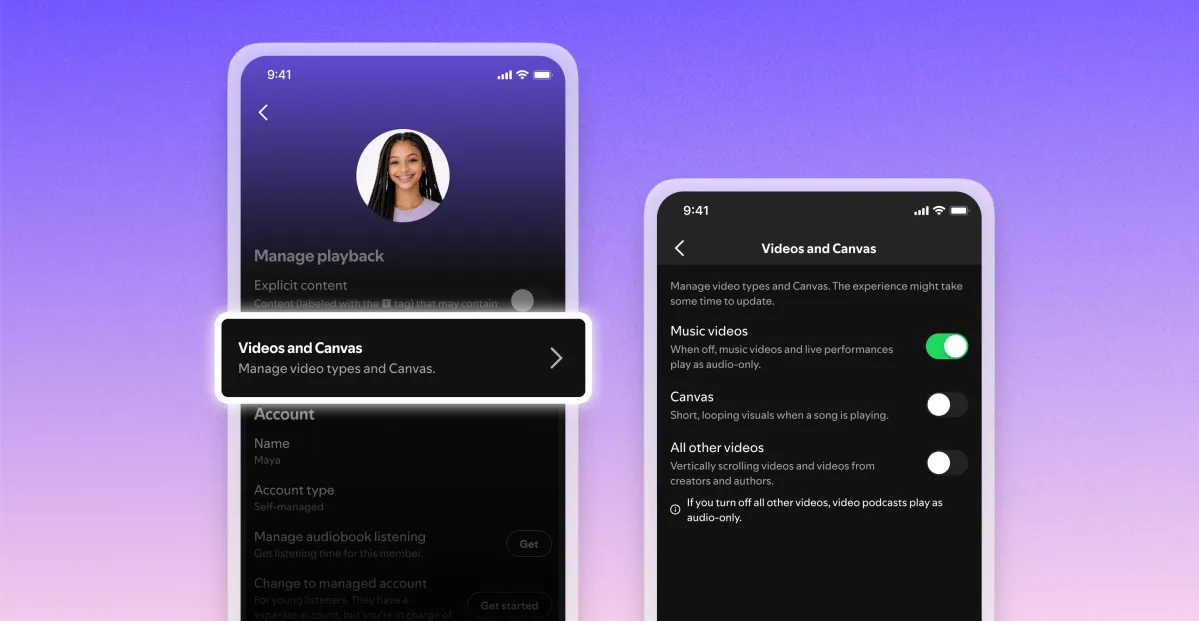
The update introduces a more comprehensive approach to video management than ever before. Previously, users might have found a single toggle to disable Canvas clips. Now, that existing control is joined by two powerful new additions:
- Disable Music Videos:This toggle will prevent any dedicated music videos from playing, ensuring that when you select a song, you only get the audio experience.
- Disable All Other Videos:This broad control targets a wider array of visual content, including video versions of podcasts and the increasingly common vertical video formats that might appear within the app.
When these controls are enabled, users will no longer have the option to switch to the video versions of songs or podcasts, effectively transforming their Spotify app into a purely audio interface. This level of granularity means that whether you’re a long-time subscriber or a new user, you can tailor your interaction with Spotify precisely to your preferences.
Empowering Family Plan Managers: Curated Experiences for Everyone
One of the most impactful aspects of this rollout is its integration with Spotify’s Family Plans. Managers of these plans will gain access to these video controls for each individual member on their subscription. This mirrors existing parental control features, offering a crucial layer of content management.
Imagine a scenario where a parent wants to ensure their child has a purely audio experience, free from potentially distracting or age-inappropriate visual content. With these new controls, the Family Plan manager can disable video content specifically for that child’s account. Once disabled at the plan level, those users will not even see the option to switch to video versions, providing a truly consistent and controlled environment. This feature significantly enhances Spotify’s utility for families, making it easier to curate a listening experience that aligns with household preferences and safety considerations.
Where to Find Your New Controls
While the rollout is global, users should anticipate a staggered release, meaning the controls may not appear on all accounts simultaneously. Once available, accessing these settings will be intuitive:
- On Mobile Devices (Phones/Tablets):Navigate to the “Content and display” section within your settings.
- On Desktop Applications:Look for these options under the “Display” section of your settings.
The global nature of the rollout ensures that regardless of your location or preferred device, these enhanced personalization options will soon be within reach.
The Bottom Line: Spotify Listens, Users Benefit
Spotify’s introduction of comprehensive video toggles is more than just a new feature; it’s a testament to the platform’s evolving understanding of its diverse user base. By providing such granular control, Spotify is empowering users to sculpt their ideal listening environment, whether that means saving data on the go, extending battery life, or simply removing visual distractions to focus purely on the audio experience. This move not only enhances user satisfaction but also reinforces Spotify’s position as a user-centric platform, continually adapting to meet the varied needs and preferences of its global audience. It’s a win for personalization, a win for data economy, and ultimately, a win for the listener.
Source:{feed_title}